
ManyCam virtual webcam for multi-source live video production and streaming
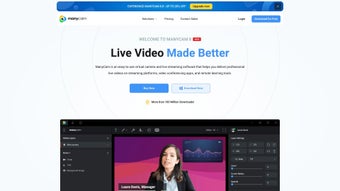
Experience ManyCam, developed by ManyCam LLC., as a live video and virtual webcam solution that enhances video chats and streaming sessions. The app consolidates webcams, desktop capture, and media files into a single selectable camera for conferencing or broadcasting. It targets instructors, business presenters, and streamers who need on-screen compositing, live switching, and basic studio-style controls for lessons, remote meetings, and live shows.
Top Recommended Alternative

How ManyCam consolidates multiple video sources
The app functions as a virtual webcam that aggregates live inputs and recorded media into one output. Supported inputs include local webcams, desktop capture (full-screen, window, region), media files, YouTube streams, and mobile device cameras. It also supports NDI for local network send and receive and picture-in-picture layering, so users can compose several layers that appear as a single camera inside other software.
Does ManyCam affect system or network performance?
ManyCam’s high-definition output, NDI transport, and direct RTMP streaming use CPU and network bandwidth, notably when multiple layers or HD sources are active. User reports indicate the app can be resource-intensive on older hardware, so expect greater load during multi-source or 4K-capable sessions. Confirm your desktop and network capacity before long broadcasts to reduce the risk of dropped frames or lag.
Is ManyCam appropriate for classroom and meeting environments?
The app integrates as a selectable virtual camera in mainstream conferencing tools, enabling use inside meeting and classroom software. It provides AI-powered virtual background removal and a chroma key option for green-screen compositing without extra hardware. Those features allow instructors and presenters to alter or hide backgrounds while appearing as a standard camera device to attendees and recording tools.
Do non-technical users need help to operate advanced workflows?
The interface simplifies source switching and applying effects, and an extensive library of over 12,000 masks and filters lets casual users add visuals quickly. Nevertheless, advanced workflows such as NDI routing, RTMP setup, and high-resolution output require knowledge of network and capture settings. Using a mobile device as a wireless camera also requires pairing steps that some users may need help to complete.
ManyCam suits multi-source broadcasters who can provide sufficient hardware
ManyCam is a practical option for educators, presenters, and streamers who need a virtual webcam that unifies multiple inputs and on-air compositing. Its primary drawback is the increased system and network demands when using HD layers, network transport, or multiple sources at once. Users with adequate hardware and time for configuration gain flexible production control, while those on older machines should test setups before live sessions.